Demo · synthetic data · real APIs in test accounts
Bring store orders, ad reports and customer feedback into one view. Investigate conflicting figures, spot changing feedback, and see when a connection needs attention.
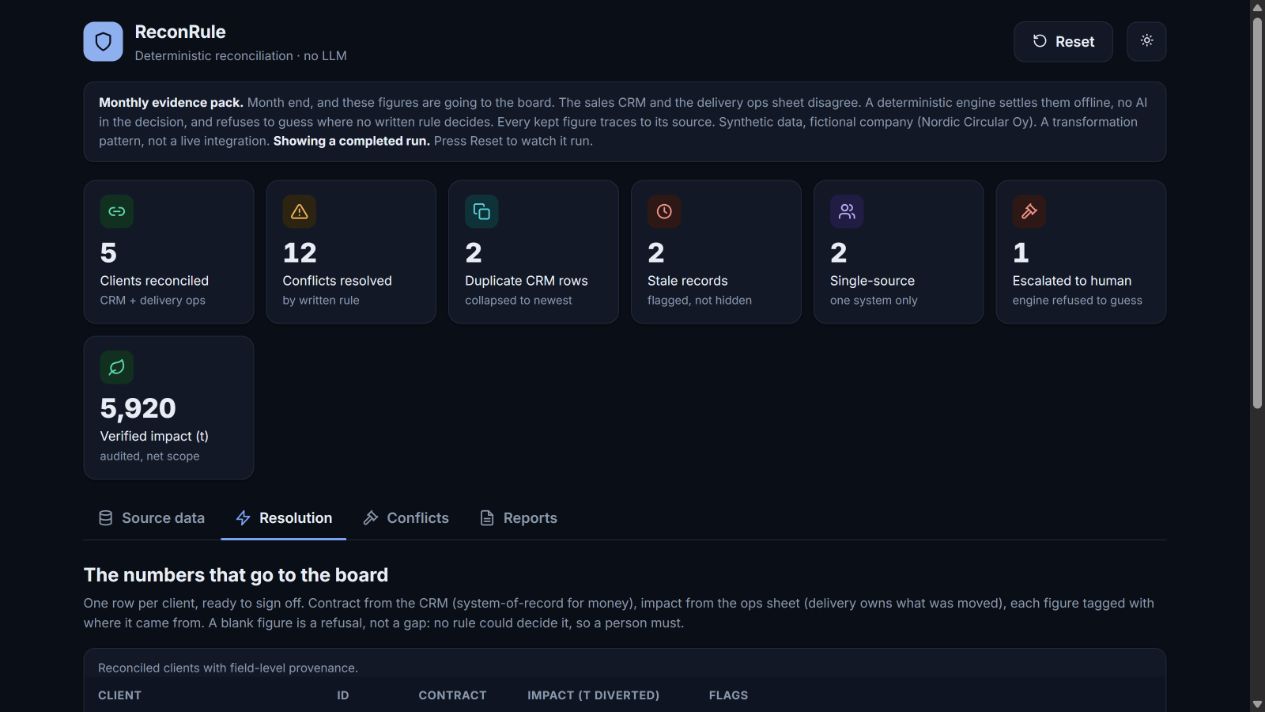
Sales and delivery disagree. Build a report with a visible rule and source behind each chosen figure.
Conflicting spreadsheets turn reporting into a series of judgment calls. This engine applies written rules to each field and keeps the source behind every selected value. You get traceable report outputs, with unresolved conflicts left for review. Explore a synthetic month-end reporting example.
Actual product captureDemo · synthetic data
THE DECISION / WHICH FIGURE CAN THE REPORT USE?
Two systems disagree. The rule has to explain the result.
At month end, sales and delivery tell different stories. Reconciliation needs a source for each fact—and a way to stop when no rule can decide.
01 Contract value
POHJANTERÄS NORDICS / CL-001
SALES CRM
€52,000
Newest CRM row · 1 December 2025
DELIVERY OPS
€50,000
Project PRJ-2025-14
The written rule
Contract value comes from the CRM. Sales owns the commercial record; the newest CRM row supplies the value.
What goes into the report
€52,000
Kept from CRM · source retained
Choose the source for this field.
The engine keeps the CRM amount rather than averaging the two systems. The rule explains why the delivery figure did not win.
02 Delivered impact
POHJANTERÄS NORDICS / CL-001
SALES CRM
2,000 t
Pledged impact · newest CRM row
DELIVERY OPS
2,210 t
Delivered impact · project PRJ-2025-14
The written rule
Delivered impact comes from the operational sheet. Delivery owns what was actually moved; a sales pledge measures something else.
What goes into the report
2,210 t
Kept from delivery ops · source retained
Different facts have different owners.
Choosing the CRM for contract value does not make it authoritative for every field. The report preserves the distinction between pledged and delivered impact.
03 Unresolved conflict
TURUN KIERTOKESKUS OY / CL-005
CRM ROW A
€41,000
Updated 20 January 2026
CRM ROW B
€45,000
Updated 20 January 2026
The written rule
Use the newest CRM row for contract value. These rows have the same update date and disagree, so that rule cannot select a winner.
What goes into the report
—
Contract value withheld · human review required
A blank can be the correct result.
The engine flags the conflicting records instead of guessing. The 880 tonnes recorded by delivery remain available; the unresolved contract is a separate question.
Decisions are deterministic, with no AI model choosing the figures. Stale and single-source records remain flagged for review. A resolved value retains its source; it is not a guarantee that the underlying record is correct.
Illustrated from the public Nordic Circular Oy demo. All records are synthetic and the company is fictional. The offline Python pipeline produces four report formats; the demo shows the transformation pattern, not a live integration.
When CRM and operational spreadsheets disagree, assembling a report means deciding which figure to use and explaining that choice later. This engine matches records and applies explicit rules for each field: the CRM can own contract value while the operational sheet owns delivered impact. You get report outputs with traceable values and unresolved conflicts left for human review.
How it works
Match the same entities across the two source systems.
Apply field-level source rules and flag stale or single-source information.
Generate four report formats, retaining the source of each reconciled value.
My contributionDeveloped the offline Python pipeline, including field-level source rules, source tracking and four report outputs. Kept reconciliation decisions explicit in code.
19Voice Access to Reconciled DataAsk about business figures aloud in Finnish, and hear why a particular value was selected.
Operational decision support
Finding a reported figure can mean opening source sheets and reading reconciliation rules. This voice interface lets a person ask for the number and the reason behind it in Finnish. Read-only tools retrieve the figures and their source rules; the model explains them while code retains control of the values and reconciliation decisions.
How it works
Transcribe a spoken Finnish question locally.
Use a read-only tool to retrieve figures and the source rules behind them.
Speak the explanation while code controls the figures and reconciliation decisions.
My contributionBuilt the Python voice interface over the reconciliation engine, using local transcription and speech output with read-only access to its data.
23Material Certificate ReconcilerCheck that a supplier’s material certificate (the test report for one batch of steel) really matches the material that arrived, and see which cases still need a person.Live
Suppliers send a certificate with the material they deliver: a test report for one production batch, which the buyer keeps as proof of what they received. Having a certificate on file does not prove it covers the material that arrived. This checker matches each delivery to a certificate by batch, lot and order number, and accepts a match only when exactly one certificate fits the rules. People then look only at the cases where a certificate is missing, its numbers disagree with the delivery, or more than one could match.
How it works
Check the received material against the certificate evidence.
Accept a match only when exactly one certificate satisfies the rules.
Send missing, conflicting and ambiguous cases for human review.
My contributionImplemented the Python matching rules and acceptance tests, including the conditions that prevent an automatic match.
Deterministic demonstration using fictional data.
Tools & approach
Python · PDF documents · Fixed rules · Human review
24PO Confirmation ReconcilerFind purchase orders that need a buyer's attention without checking every supplier confirmation by hand.Live
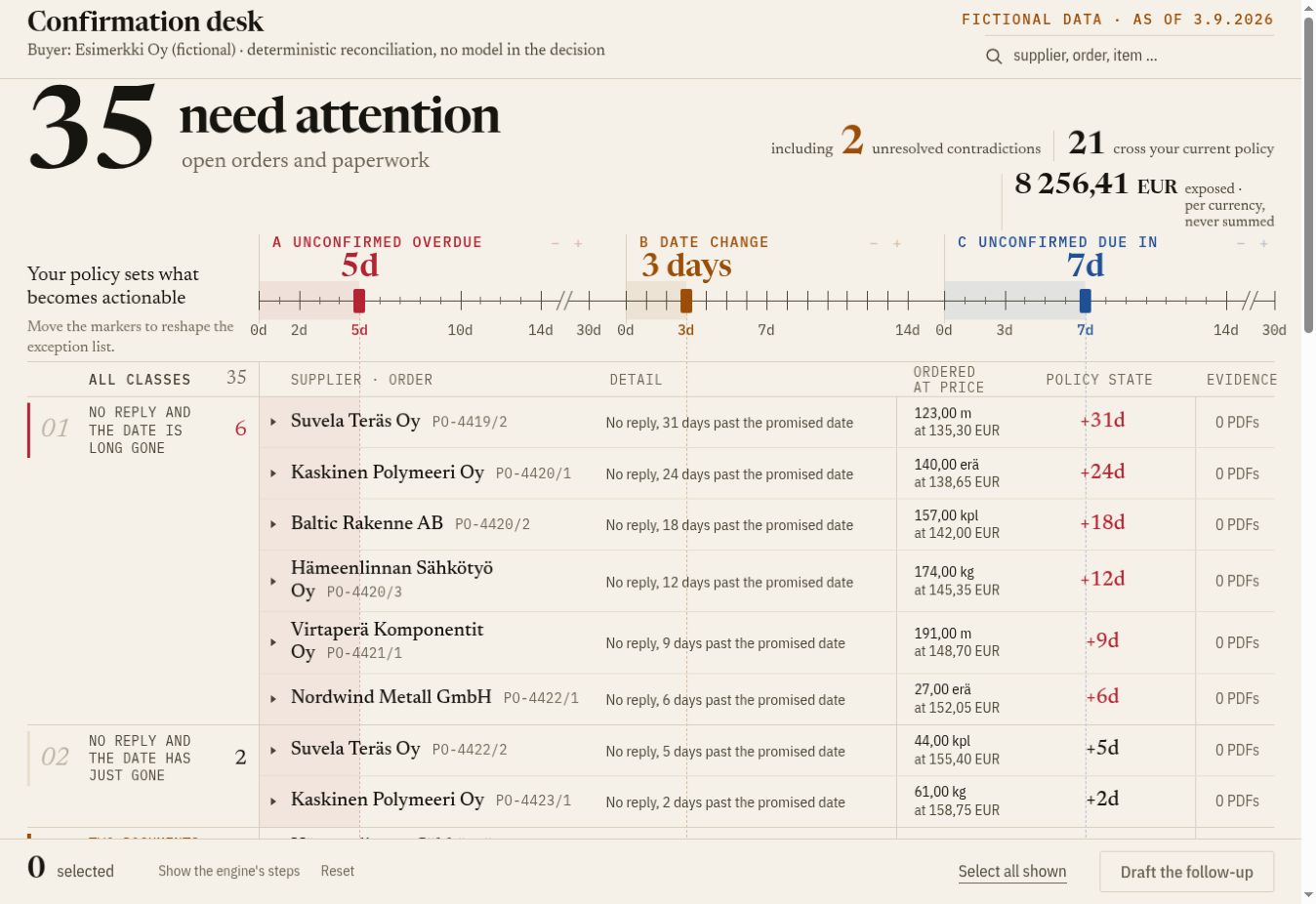
Compare supplier documents with open orders using buyer-set rules. Bring the exceptions and their evidence together for follow-up, keeping conflicting claims visible.
01 / CONFIRMATION DESK · DEMO · FICTIONAL DATA
From open orders to the next call.
Which orders need a follow-up? See the order, the buyer’s rule and the supplier’s evidence together.
35 need attention
Start with one order.
21 of them break the buyer’s current limits. See why the first order needs attention.
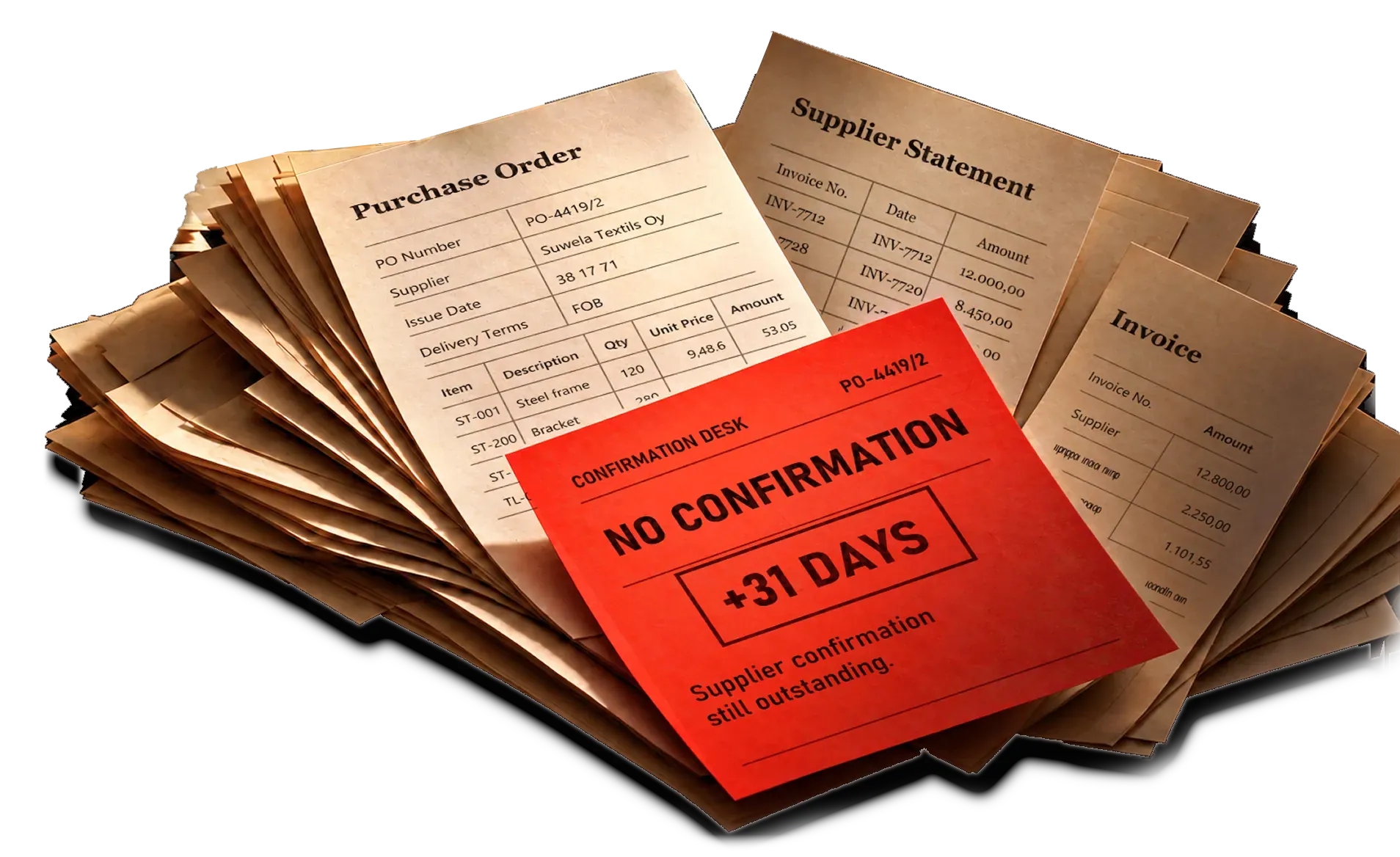
First order: Suvela Teräs Oy · PO-4419/2.
PO-4419/2 · SUVELA TERÄS OY
31 days past the promised date
Three facts. One exception.
This order is 31 days overdue, beyond the buyer’s 5-day threshold. No supplier confirmation is attached.
A reason for the next call.
A possible next step: follow up with Suvela Teräs Oy about the overdue order and missing confirmation.
The desk drafts the follow-up for the buyer to copy. The buyer decides whether to send anything.
Illustrated from the demo. Fictional data.
Supplier confirmations can move a delivery date, change a price or short a quantity, leaving a buyer to compare PDFs with open orders and decide what matters. This desk reads each confirmation and checks it against the order with fixed rules, flagging what crosses the buyer’s thresholds. Each exception shows the order beside the supplier’s confirmation, with the PDF page it was read from one click away. When two documents disagree, both claims stay visible rather than one being picked silently.
How it works
Read supplier confirmation PDFs and match them to lines in an open-order spreadsheet.
Flag date slips, price moves and quantity changes against the buyer’s thresholds, and set aside lines that can’t be compared, such as a different currency or unit.
Keep contradictory claims visible for the buyer’s decision.
Draft supplier follow-ups for the buyer to copy. Nothing is sent.
My contributionBuilt the reconciliation demo with explicit comparison rules and three thresholds the buyer can adjust. Kept conflicting supplier claims visible instead of selecting one automatically. Tested the PDF reader against independent ERP exports: on 15 confirmations printed by fresh Odoo 17 and ERPNext v15 installs, 803 of 803 gradable fields agreed. Not yet tested on real supplier confirmations.
No AI model reads the documents or makes the decisions. Fictional data.
Tools & approach
Python · PDF text extraction · Fixed rules · Buyer decides
27DTC Ops LayerBring ad reports, store orders and customer feedback together, so you can investigate differences without switching between tools.Video
Operational decision support · Business automation · Demo · synthetic data · real APIs in test accounts See it in the featured section ↑
Bring store orders, ad reports and customer feedback into one view. Investigate conflicting figures, spot changing feedback, and see when a connection needs attention.
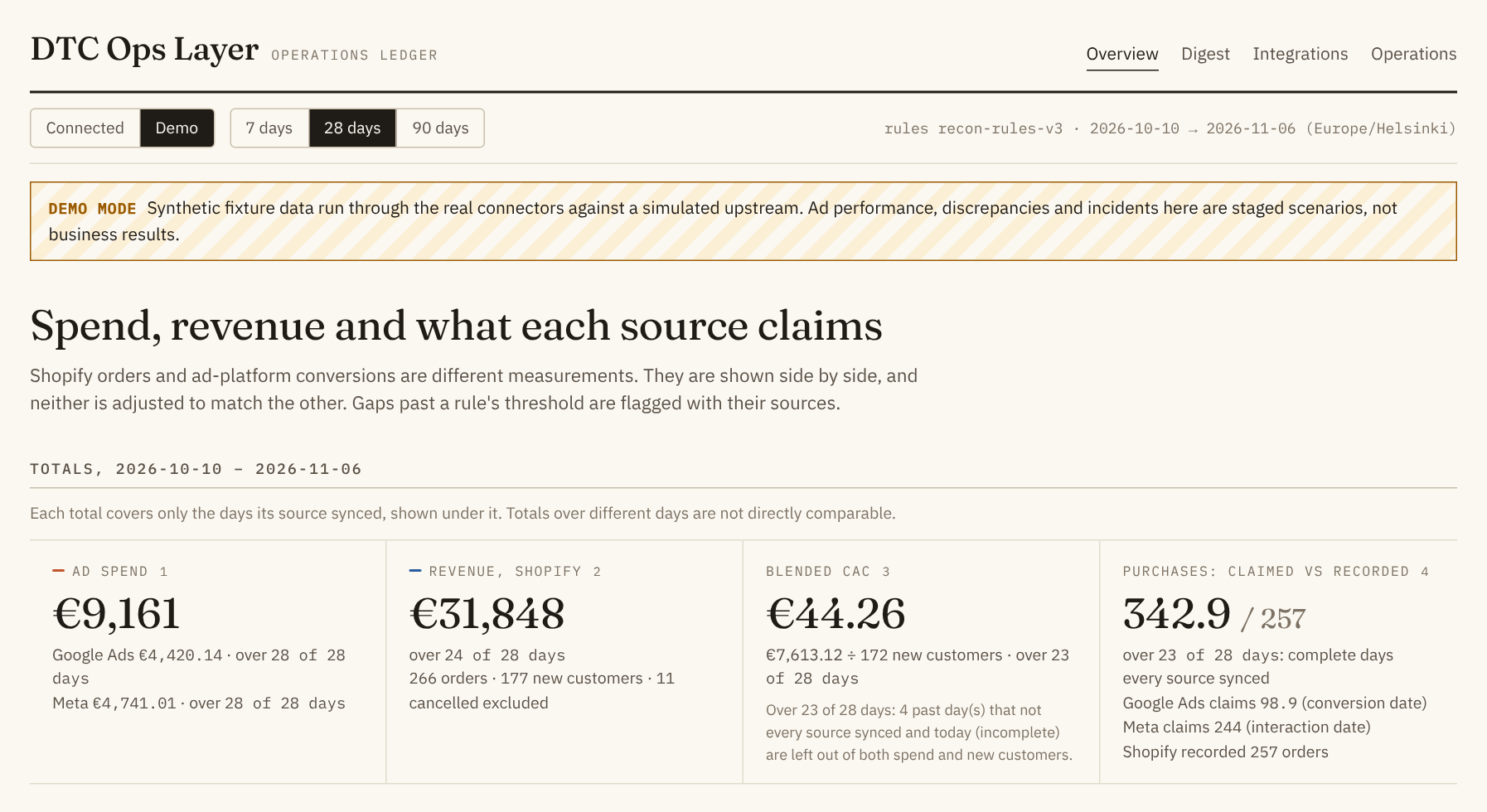
Ad platforms claim 342.9 purchases. Shopify recorded 257 orders. What needs checking? In this synthetic example, the dashboard shows each source's figures side by side without adjusting either, flags gaps that pass a rule's threshold, and lists possible causes with the sources and reporting windows behind them. Connection status and incident history show whether the data is arriving reliably.
Actual product captureDemo · synthetic data · real APIs in test accounts
An online store's ad platforms report purchases, Shopify records orders, and customer feedback arrives somewhere else. Understanding performance means checking those sources together, and knowing when they measure different things.
DTC Ops Layer brings Shopify, Google Ads and Google Forms into one dashboard. Fixed rules flag discrepancies and list possible causes, with source details available for inspection. A weekly feedback digest highlights changing themes, while connection status and incident history show whether the underlying syncs are working.
How it works
Sync orders, ad reports and feedback into a shared database, keeping their sources and sync history.
Compare the figures using explicit rules, keeping differences in measurement visible.
Summarise feedback themes with code-calculated counts and checked numerical claims.
Track connection failures, recovery and recorded fixes.
My contributionBuilt the connectors, sync jobs, database and dashboard. Implemented discrepancy rules, source tracking, feedback-summary checks and incident handling. Connected Shopify, Google Ads and Google Forms through their real APIs in test accounts; repeat Shopify and Forms syncs added no duplicate records. Google Ads test accounts return no metrics, so all ad figures shown are synthetic.
The dashboard walkthrough uses labelled synthetic data and a mock AI digest; its ad figures include synthetic Meta data, and Meta is not connected. The video also shows recorded API runs against test accounts. No real customer activity, ad spend or unattended production operation is demonstrated.
Tools & approach
TypeScript · Next.js · PostgreSQL · Shopify Admin GraphQL API · Google Ads API · Google Forms API · OAuth
AI control & generation4
01AI Request GatewayGive an AI assistant a clear boundary before requests reach its documents or model budget.Video
An assistant open to customer requests needs a way to handle instructions it should not follow. This gateway checks each request first and routes it to an answer, a clarification or a refusal. You get an inspectable decision receipt, so you can examine why a request was allowed or stopped.
How it works
Check explicit override patterns before calling a model.
Use a small model to allow, clarify or refuse the remaining requests.
Record the decision and its explanation in a receipt.
My contributionImplemented the TypeScript gateway, combining explicit checks with model-assisted routing. Defined the evaluation before running it and retained decision receipts for inspection.
Evaluated against ten labels defined before the first run. This small sample does not establish protection against prompt injection.
Tools & approach
Request routing · Request checks · TypeScript · Claude Haiku
17Clean Grant AppTurn founder notes into an EIC Short Proposal draft, then see what still needs evidence.Live
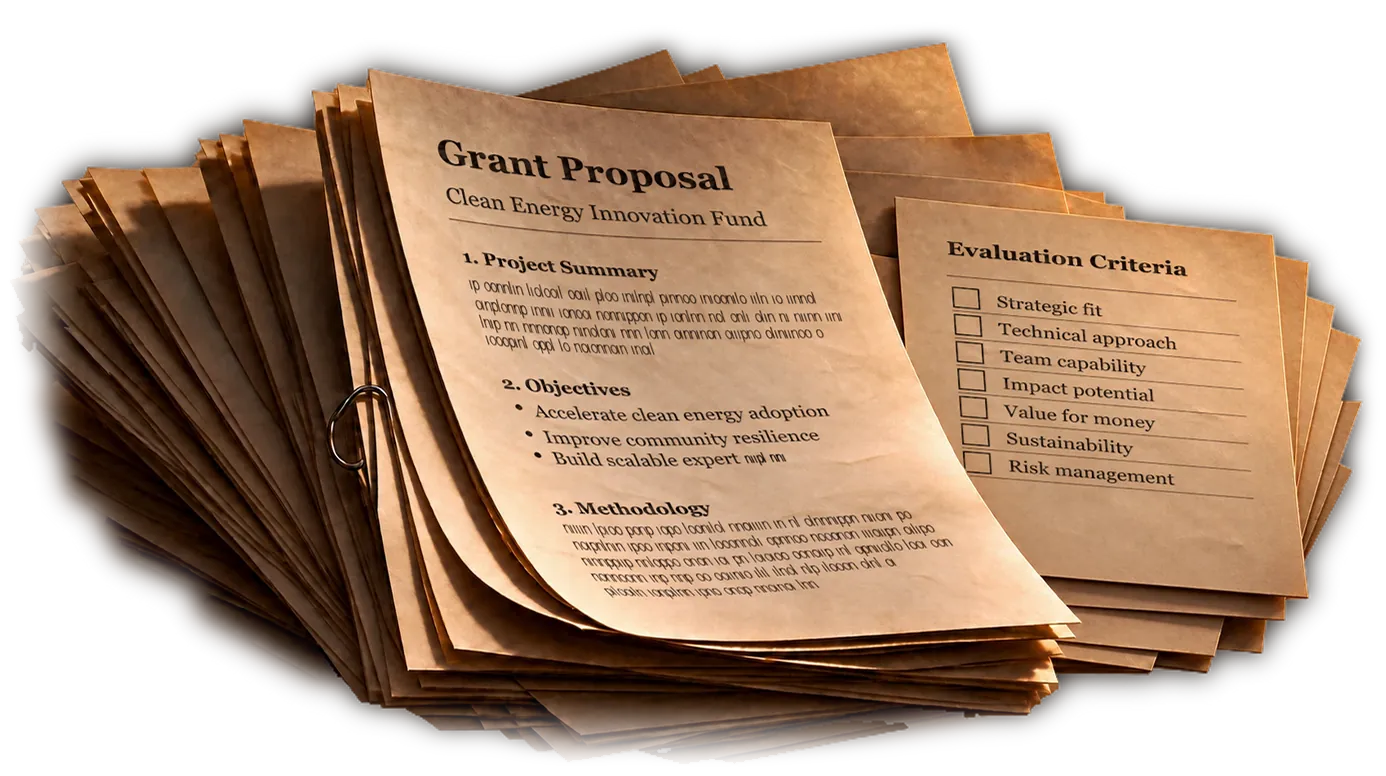
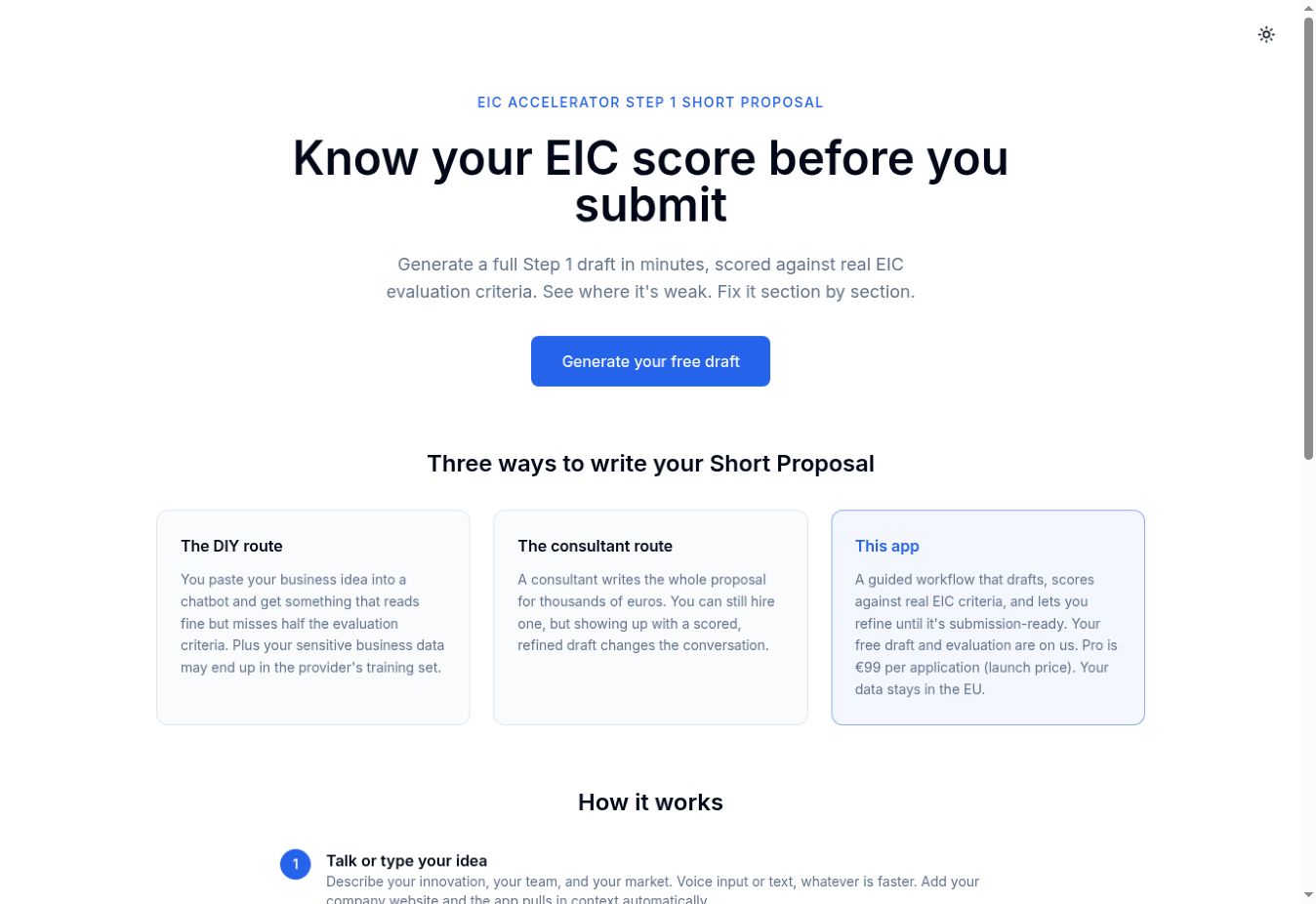
Turning founder knowledge into an application means organising the material and checking it against the criteria. Voice notes, written answers and a pitch deck become a structured draft with a review of weak or missing coverage, so the founder can focus the next revision. Processing is hosted on EU infrastructure. The capture shows the public landing page; the proposal workspace requires sign-in.
THE DECISION / WHAT NEEDS ANOTHER DRAFT?
A fluent draft is only the beginning.
Does each section answer the evaluation criteria? What evidence does the founder still need to supply?
How the draft is reviewed
01 / FOUNDER INPUT
The business behind the words.
Voice or text describes the innovation, team and market. A pitch deck adds supporting material.
02 / STRUCTURED DRAFT
Put the material where it belongs.
The application organises the founder’s material into the EIC Short Proposal sections.
03 / CRITERIA REVIEW
Find the gaps before submission.
The evaluator checks sections against the criteria and identifies weak or missing coverage. The founder can refine a section and evaluate it again.
The evaluation guides revision. It does not predict a funding decision.
Workflow explanation based on the project description and public product page. The signed-in workspace is not reproduced here.
A founder's knowledge is spread across voice notes, written answers and a pitch deck, while the application needs structured sections that address specific criteria. Clean Grant App brings that material into an EIC Accelerator Short Proposal draft and reviews its criteria coverage. The founder gets a draft to revise and a clearer view of weak or missing material before submission.
How it works
Collect founder input through voice, text and a pitch deck.
Draft the EIC Accelerator Short Proposal sections.
Review criteria coverage, identify gaps and let the founder revise.
My contributionBuilt the drafting and criteria-review application, with voice and pitch-deck inputs and processing hosted on EU infrastructure.
Public landing page. Proposal workspace requires sign-in.
20Agency Proposal & Scoping AssistantMove from an agency discovery call to a reviewable proposal, or a scoping brief when too much is still unknown.Video
Writing a proposal after a discovery call takes time, and an incomplete brief can tempt an agency to commit to scope or pricing too early. This assistant checks whether the conversation supports a proposal and prepares an unpriced scoping brief when it does not. The agency gets a draft informed by its public writing style, with human verification required before sending.
How it works
Qualify the lead and choose a proposal or a scoping brief without pricing commitments.
Draft using a style profile derived from the agency’s public writing.
Show writing-style comparisons and require human verification before sending.
My contributionDeveloped the Python application with lead-qualification checks, agency-style matching and a required human review before delivery.
Demonstration using a synthetic transcript.
Tools & approach
Python · AI drafting · Human review
21Multilingual Product Copy with Fact ChecksProduce product listings in five languages without treating invented specifications as supplier facts.Live
AI control & generation · Demo · synthetic catalog
AI drafts product copy in five languages. Independent Python checks flag or remove unsupported technical specifications before they reach the catalog.
When AI turns supplier data into product copy, it can add technical claims the supplier never made. Here Claude writes descriptions in Finnish, English, Estonian, Latvian and Lithuanian. A separate Python check, which doesn’t depend on the model following instructions, compares waterproof ratings and claims, load limits and weights in the copy with the supplier’s columns. Unsupported figures are removed, and whenever something is removed or unclear, the product is flagged for a person to check.
In the demo, the built-in mock writer plants a “15000 mm” waterproof claim on a ski. The check removes it, while a rain jacket’s supplier-provided 20,000 mm rating is kept and labelled as supplier data.
How it works
Claude turns each supplier row into descriptions in five languages and suggests attributes such as material and season.
Python rules compare waterproof ratings, load limits and weights with the supplier’s columns.
Remove unsupported figures, label each attribute as supplier data, AI-generated or blank, and flag the product for review.
My contributionBuilt the Python pipeline and a rule-based check that works independently of the model, with source labels on each attribute, review flags and 41 automated tests.
13 synthetic products. The demo runs in your browser with a built-in mock writer, or with your own Claude API key.
Tools & approach
Python · Claude · Rule-based checks · Review flags
Research & evidence4
02Finnish Guidance AssistantGet Finnish light-entrepreneurship guidance you can trace back to official sources.Live
When guidance is scattered across official pages, finding an answer is only half the work: you still need to check whether it applies and is current. This assistant searches 14 official documents and shows supporting passages, publishers and update dates. You get an answer with a basis you can inspect, or a refusal when the available evidence is insufficient.
How it works
Search a fixed collection of 14 official documents.
Show passages supporting the answer, with publishers and update dates.
Exclude outdated guidance and decline to answer when evidence is insufficient.
My contributionDeveloped the guidance demo and compared two ways of finding relevant passages. Kept semantic search after examining where the combined keyword-and-semantic approach failed.
Tools & approach
Answers from source documents · Search testing · PostgreSQL · Claude
03Website Q&A ChatbotHelp visitors find the information they need without hunting through website pages.
Research & evidence
Visitors often arrive with a question rather than a page name. This chatbot retrieves relevant website content and uses it to answer their questions, giving them another route into information already published on the site.
How it works
Use the specified website as the information source.
Find relevant passages in a searchable content store.
Generate an answer from the retrieved material.
My contributionAssembled the retrieval and answer-generation flow in Langflow, using Astra DB to store website content and OpenAI to generate responses.
Tools & approach
Answers from website content · Langflow · Astra DB · OpenAI
No public preview is linked for this project.
22Equity Research Evidence MonitorTrack new evidence against an analyst report's open questions without rereading every source from scratch.Live
An analyst’s report on a listed company (equity research) is written on one date and leaves questions that later company and market news may answer. This prototype checks new documents against those questions, using the Finnish forest company UPM as the example: its wood costs, the planned spin-off of its plywood business as a separately listed company (WISA), and Nordic electricity prices. The analyst gets the relevant passages with their sources, plus what each one does not establish. Investment and valuation judgments stay with the analyst.
How it works
Check new documents against the report’s dated monitoring questions.
Use code to check sources, timing and support for claims.
Show relevant cited evidence alongside what it does not establish.
My contributionBuilt the monitoring prototype and defined its evaluation in advance. In a separate follow-up test, compared Jev, a TypeSafe classification model that returns a probability instead of written text, with the Claude workflow on one step: which documents are relevant to each question.
An evidence-monitoring prototype; it does not make investment or valuation judgments.
Tools & approach
Source research · Checks against sources · TypeScript · Claude · Jev (follow-up test)
25Apartment Asking Price CheckCompare asking prices with source-backed checks, and explore new finishes for a room you upload.Live
Research & evidence · Live application · fictional listing example
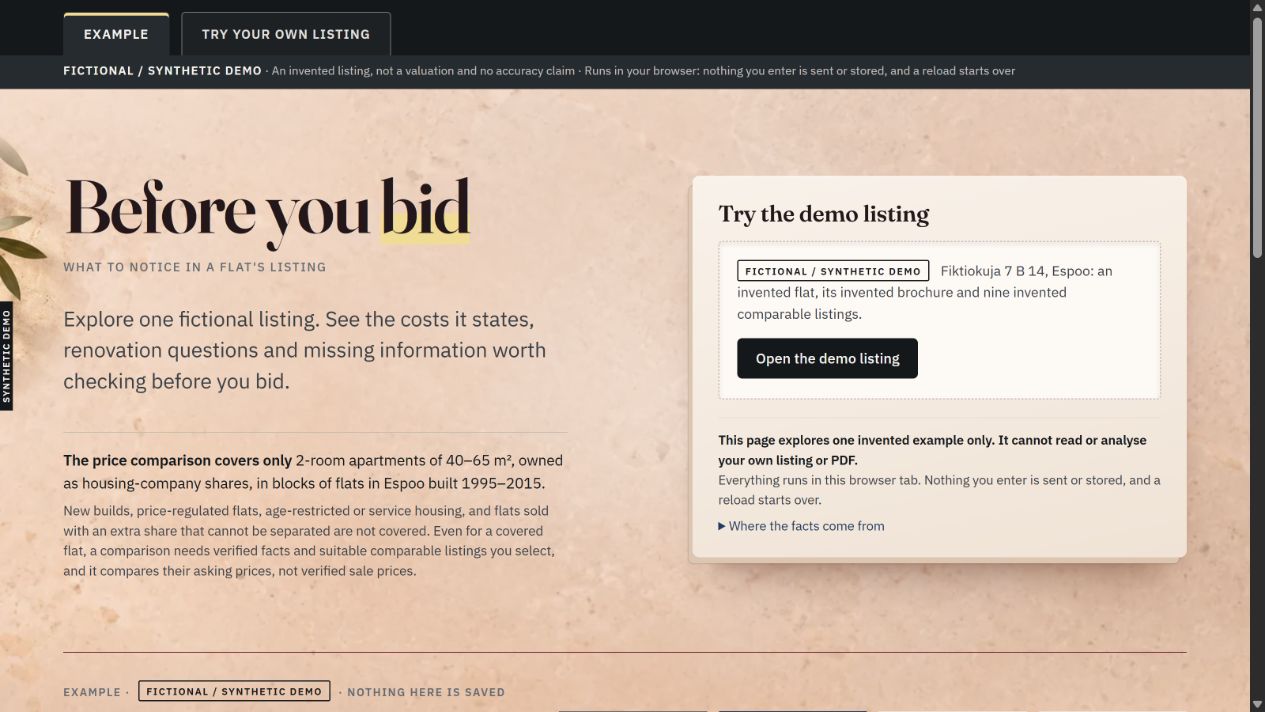
Compare an apartment’s asking price with selected listings and see what’s still unknown. Then preview new finishes on a room photo.
One application, two independent tools. The asking-price check verifies listing facts, compares selected asking prices using explicit rules, and keeps unpriced renovations visible. Future View lets visitors upload a room photo, generate a new look and compare it with the original. It doesn’t estimate renovation costs or influence the price check.
Actual product captureLive application · fictional listing example
01 / ASKING-PRICE CHECK
Verify listing facts and compare selected asking prices, with unpriced renovations kept in view.
THE DECISION / WHAT DOES THE ASKING PRICE LEAVE OPEN?
One price. Three different kinds of evidence.
A renovation can be included in the existing debt, decided but unpriced, or simply undocumented. Those distinctions change what a buyer can conclude.
01 Already included
ROOF RENOVATION / LISTING, PAGE 2
Tehdyt korjaukset: 2020 vesikaton uusiminen (rahoitettu yhtiölainalla, sisältyy velkaosuuteen).
The roof was renewed in 2020. The listing says its financing is already included in the housing-company loan share.
What the buyer can conclude
€18,600
Loan share · already inside the €235,000 debt-free asking price
Count it once.
The roof work does not add another amount to the debt-free asking price. Adding the loan share again would count the same debt twice.
02 Cost not stated
FACADE & BALCONIES / LISTING, PAGE 2
Tulevat korjaukset: Yhtiökokous on päättänyt julkisivujen ja parvekkeiden korjauksesta (toteutus 2027).
The housing company has decided to renovate the facade and balconies in 2027. The listing does not give this flat’s share of the cost.
What the buyer can conclude
+ ?
A decided renovation · no stated amount for this flat
Keep the unknown visible.
There is no amount to add yet. Ask for this flat’s share and whether it is already covered by the current loan financing before relying on a total.
03 Information missing
PIPES / STATUS NOT STATED
The demo does not establish whether pipe work is known or planned. Missing information cannot establish a renovation or its cost.
What the buyer can conclude
Not stated
No known status · no cost inferred
A missing fact is a question.
Check the supporting documents or ask for clarification. The application does not turn silence into a zero cost or an assumed renovation.
The comparison uses selected asking prices. It does not estimate market value or predict a selling price. Its supported scope is 2-room flats of 40–65 m² in Espoo apartment blocks built in 1995–2015, with further eligibility checks in the application. Values that fail source verification stay out of the calculation unless the user enters or corrects them. A result that depends on assumed facts, or leaves a renovation cost unpriced, is marked conditional.
Illustrated from the public synthetic demo, not a real property assessment. The project’s earlier 15-listing evaluation covered extraction and source verification, not price-comparison accuracy.
02 / FUTURE VIEW
Preview new finishes on a photo of a room.
THE QUESTION / WHAT COULD THIS ROOM BECOME?
See the room in new finishes. Then check what changed.
Upload a room photo, choose a combination of finishes and generate a new look. Use the before/after slider and original-outline overlay to examine the transformation.
Frame from the Future View filmAI-generated sample room · before / after
01
Upload a room
Open a photo of a room. The browser straightens and crops it, and removes the camera’s metadata before anything is sent.
02
Choose finishes
Pick a finish schedule: oiled oak and lime plaster, birch ply and warm linoleum, or smoked oak and deep green.
03
Generate
An image model renders the same room in those finishes as an illustrative proposal.
04
Compare
Drag the before/after divider, or lay the original room’s outlines over the proposal to see what moved.
Future View illustrates surfaces. It doesn’t estimate renovation costs, isn’t a construction plan and has no effect on the asking-price check.
The film shows an AI-generated sample room. Generation on the public site is limited by a server-enforced daily allowance.
An apartment can raise two different questions: what does the asking price actually account for, and what could its interior become?
The asking-price check extracts listing details from PDFs, verifies the supporting text and compares selected asking prices using explicit rules. Unknown renovation costs remain visible rather than being treated as known amounts.
Future View lets visitors upload a room photo, choose finishes and generate an illustrative new look. A before/after slider and an overlay of the original room's outlines help them compare the result.
The two features operate independently. The price check isn't a market valuation, and Future View isn't a renovation budget or construction plan.
How it works
Asking-price check
Extract listing facts with supporting quotations and page numbers.
Verify the extracted values independently of the model.
Compare selected asking prices using deterministic rules, retaining assumptions and unknown costs.
Future View
Upload a room photo and select a combination of finishes.
Generate an illustrative proposal and inspect it using the before/after and outline tools.
My contributionBuilt the React/TypeScript application, its source-verification and deterministic comparison logic, and the Future View generation workflow. Implemented in-browser photo preparation, the Microsoft Foundry integration, the comparison interface and server-enforced limits for public image generation. Evaluated listing extraction and source verification on 15 real listings.
The 15-listing evaluation covered extraction and source verification under an earlier version, not price-comparison accuracy. The public examples use a fictional listing and an AI-generated sample room.
Tools & approach
Shared frontend React · TypeScript · Vite
Asking-price check PDF.js · GPT-4.1 via EUrouter for listing extraction · Deterministic source verification · Deterministic calculation rules
Future View FLUX.2 [pro] via Microsoft Foundry (EU Data Zone) · Vercel Functions · Upstash Redis for public-generation allowances
Discovery1
26AI Opportunity AuditDecide which AI work is worth starting, and what needs better data before it can pay off.Live
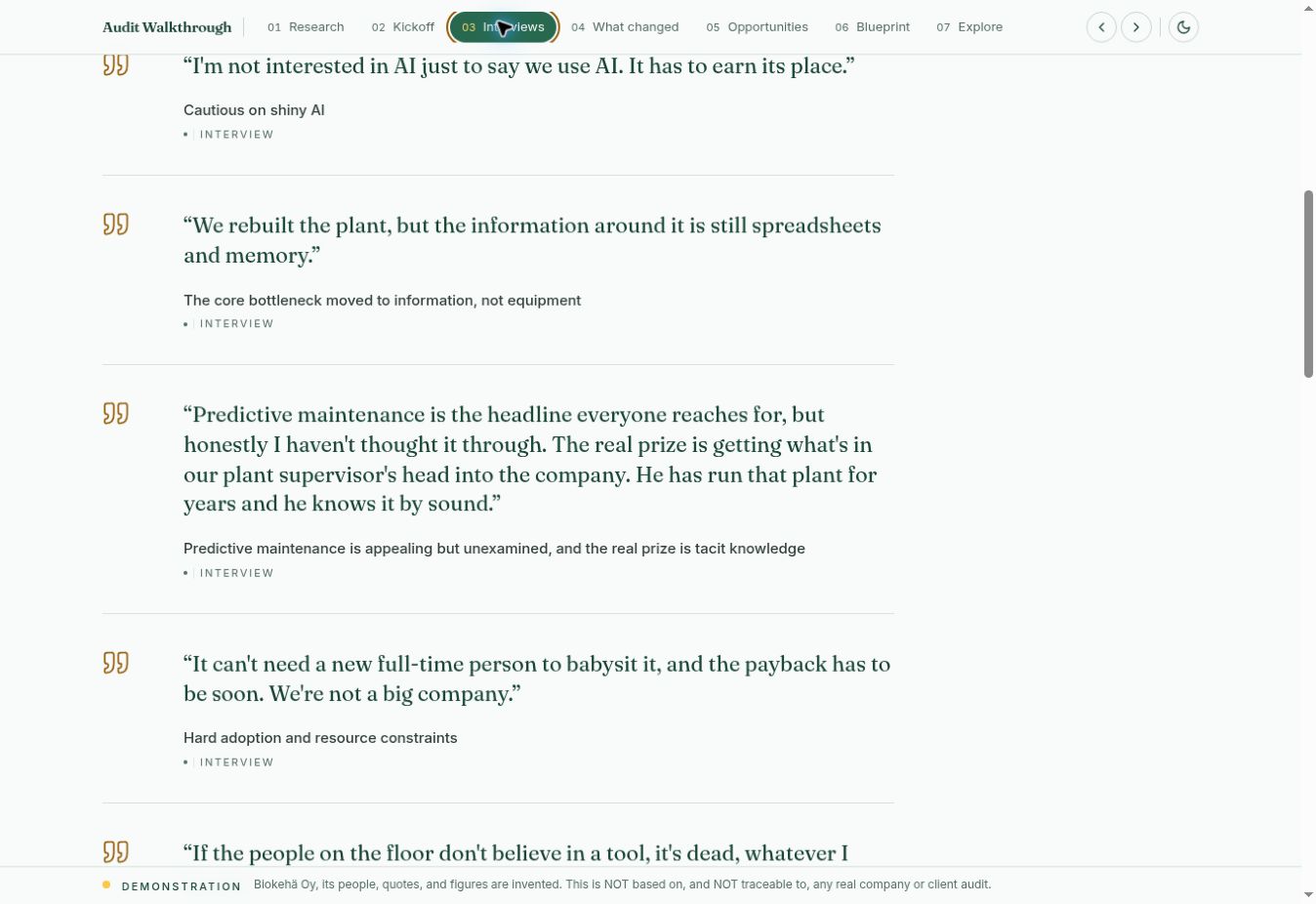
A compelling AI idea is not enough to decide what to build first. Here, the company wanted AI to predict machine breakdowns (predictive maintenance). Interviews with the people doing the work showed breakdowns are fixed but never recorded, so there is nothing for a model to learn from, while a quarterly report is still put together by hand from four sources. The plan starts with that report. Next comes a forecast of how much waste will arrive in the coming weeks. The AI idea waits until a breakdown history exists. The company, people, interviews and figures are fictional.
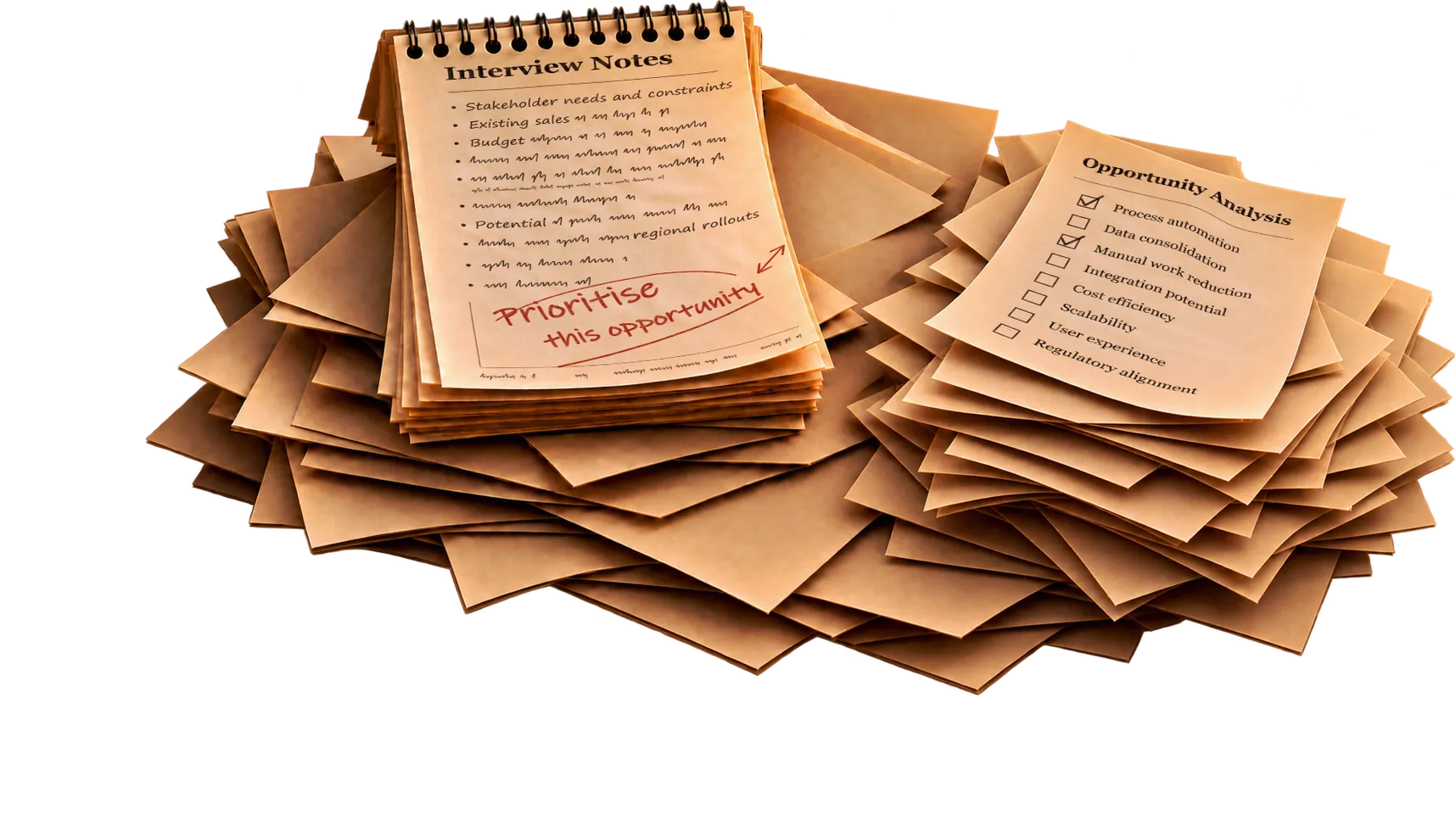
THE DECISION / WHAT IS WORTH BUILDING?
The interviews changed the plan.
Predicting machine breakdowns was the headline idea at the first meeting. What the interviews found put the hand-built report first.
NOW Reporting
Make the recurring work easier first.
What the interviews revealed
The quarterly pack is assembled by hand from four sources. The same metric already has two defensible values.
What that changes
Automate the reporting pack, with agreed metric definitions and visible exceptions.
People retain ownership of definitions, approval and exceptions.
NEXT Incoming waste forecast
A forecast needs a shared foundation.
What the interviews revealed
Inbound information arrives by phone and message, then gets retyped. Uneven waste deliveries are a major operational problem.
What that changes
Sequence a two-to-four-week forecast after the reporting work has established the data sources and metric definitions.
The dependency determines the sequence: establish the data foundation first.
NOT YET Breakdown prediction
The strongest recommendation can be to wait.
What the interviews revealed
Failures are fixed but not recorded. There is no parts-and-downtime history for a predictive model to learn from.
What that changes
Start a lightweight incident log owned by the plant supervisor. Revisit predictive maintenance once a usable history exists.
Any later industrial machine-learning implementation belongs with a specialist partner.
From the fictional Biokehä audit walkthrough. Company, interviews and recommendations are illustrative; this is not a client result.
A promising AI idea can absorb attention before anyone understands the work or the data behind it. In this fictional audit, the company wanted AI to predict machine breakdowns, but interviews showed breakdowns are fixed without being recorded, and a quarterly report is still put together by hand from four sources. The plan fixes the report first. Next comes a forecast of how much waste will arrive in the coming weeks, and a simple breakdown log starts so prediction can come later. Each step names its evidence, what it depends on and who owns it.
How it works
Examine the kickoff assumptions and interview the people doing the work.
Compare opportunities by evidence, dependencies, impact and effort.
Prioritise reporting, sequence forecasting next and establish an incident history before predictive maintenance.
My contributionCreated the fictional research, interview walkthrough and implementation blueprint, linking each recommendation to evidence, dependencies and the people responsible.
Fictional company, people, interviews and figures. Not a client result.
Tools & approach
Interactive walkthrough · Understanding the work · Readiness for AI · Choosing what to build first · Fictional scenario
Business automation13
04Quote Drafting PrototypePrepare quotation drafts from customer records without copying details into a document.Video
Turn customer records into quotation drafts without re-entering the information.
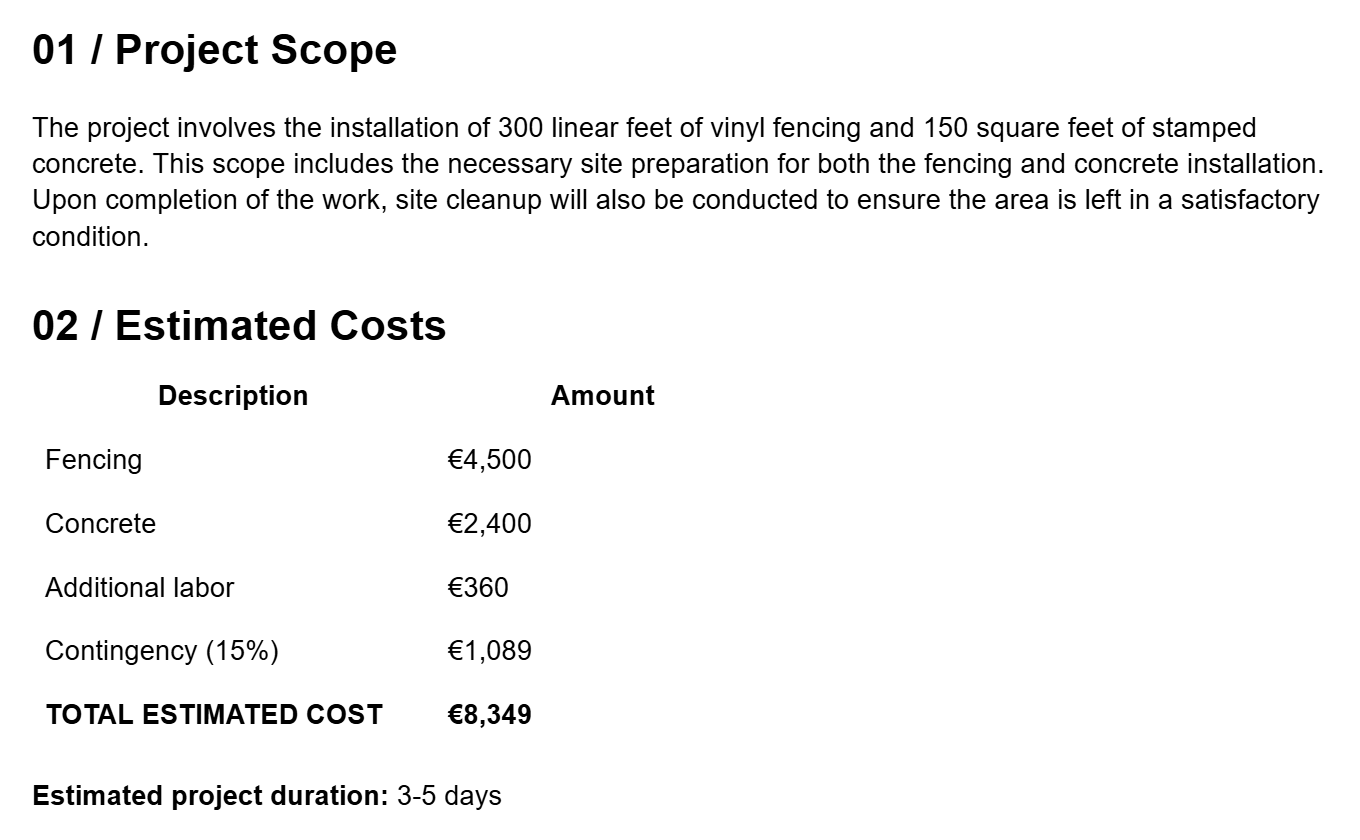
This workflow takes customer and project details from Google Sheets, calculates costs using predefined pricing rules, and generates a quotation in Google Docs. AI drafts the project description and a follow-up message, while the financial calculations remain deterministic. The finished document is linked back to the original record for review.
Generated quotation draftDemo video · fictional data
Preparing a quote often involves retrieving customer information, calculating costs and transferring the details into a document. This prototype connects those steps: it reads project records from Google Sheets, uses predefined formulas to calculate the estimate, and populates a reusable Google Docs quotation template.
AI is used to draft the project description and a follow-up message. Pricing and timeline calculations follow explicit rules rather than AI-generated estimates. The resulting quotation remains a draft for human review.
How it works
Read customer and project records marked “Ready for Automation” in Google Sheets.
Calculate fencing, concrete and labor costs, add a 15% contingency, and determine the estimated timeline using predefined spreadsheet formulas.
Use OpenAI to draft a project description based on the customer’s notes.
Copy a formatted Google Docs template and populate it with customer details, project scope, itemized costs and the estimated timeline.
Generate a follow-up message and save it, along with the quotation link and completion status, to the original Google Sheets record.
My contributionBuilt the n8n workflow, created the pricing calculations in Google Sheets, configured AI-assisted content generation, and integrated Google Drive and Google Docs to produce quotation drafts from reusable templates.
Demonstration using fictional customer and project data.
Tools & approach
n8n · Google Sheets · OpenAI · Google Docs · Google Drive
05CV Review PrototypeBring separate CVs into one review sheet, with extracted text and AI assessments together.
Business automation
Comparing applications means opening separate CVs and collecting notes in a common place. This prototype extracts CV text and adds an AI assessment and score to Google Sheets. Reviewers get a shared starting point for comparison; the generated assessment still needs human judgment.
How it works
Receive application form data and extract the CV text.
Request an AI assessment and score.
Write the results to Google Sheets for review.
My contributionImplemented the n8n sequence from application intake through CV extraction and AI scoring to a spreadsheet entry.
Tools & approach
n8n · PDF extraction · OpenAI
No public preview is linked for this project.
06CRM Follow-Up AutomationKeep customer follow-ups tied to CRM progress without sending each message by hand.
Business automation
A customer moves to the next stage, but someone still has to remember the follow-up. This workflow connects ClickUp status changes to the corresponding message through Make.com. The next communication follows the recorded stage instead of relying on a separate reminder to send it.
How it works
Watch for status changes in ClickUp.
Trigger the corresponding workflow in Make.com.
Send the customer follow-up message.
My contributionMapped ClickUp status changes to follow-up messages and implemented the triggers and delivery in Make.com.
Tools & approach
Make.com · ClickUp · Customer follow-ups
No public preview is linked for this project.
07Scheduled Listing CollectorCollect property listings overnight instead of checking the same pages by hand.
Business automation
Keeping a spreadsheet of property listings up to date means revisiting the same websites and copying new entries. This workflow does it on a schedule: it collects the listings from the web pages (with ScraperAPI) and writes them to Google Sheets. The sheet stays up to date without anyone copying from page to sheet.
How it works
Start the collection on a schedule in Make.com.
Collect listing information through ScraperAPI.
Write the results to Google Sheets.
My contributionSet up the scheduled collection pipeline across ScraperAPI, Make.com and Google Sheets.
Tools & approach
Website data collection · Make.com · Google Sheets
No public preview is linked for this project.
08Lead Research & Opening LinesGive new leads a starting point for outreach, with suggested context and opening lines in the CRM.Video
A new lead record gives you contact details, but preparing a relevant first message takes more work. This workflow adds Gemini-generated sales insights and opening-line suggestions to Salesforce and Google Sheets. The salesperson gets material to assess and adapt alongside the lead, rather than starting with an empty message.
How it works
Start when a Salesforce lead is created.
Generate sales insights and icebreaker suggestions with Gemini.
Save the suggestions in Salesforce and Google Sheets.
My contributionImplemented the new-lead trigger, Gemini generation and updates to both the CRM record and the tracking spreadsheet.
Tools & approach
Salesforce · Gemini · Make.com
09Lead Email AutoresponderGet a personalised draft reply to each email from a potential customer, and keep each exchange linked to the customer’s record.
Business automation
Incoming enquiries create a repeated task: read the message, work out a reply and keep the exchange connected to the lead. Here AI (GPT-4) reads each enquiry and drafts a reply, linked to the lead in ClickUp, the CRM. A person goes through each draft and finalises it before it is sent.
How it works
Start when a lead email arrives.
Analyse the message and generate a reply with OpenAI.
Deliver the reply through the workflow connected to ClickUp CRM.
My contributionAssembled the Make.com workflow linking incoming email, GPT-4 response generation and ClickUp CRM.
Tools & approach
Make.com · OpenAI · ClickUp
No public preview is linked for this project.
10Photography Booking WorkflowKeep photography clients informed from booking to appointment, without managing each reminder separately.
Business automation
One photography booking creates several communication tasks: confirmation, billing information, preparation advice and reminders. This prototype coordinates those messages around a ClickUp booking record, including an email seven days before the session and an SMS the day before. The photographer gets a defined communication sequence instead of a separate task for every message.
How it works
Create a ClickUp record from a simulated WordPress booking event.
Send confirmation, billing and preparation emails.
Send an email seven days before the booking and an SMS one day before.
My contributionDesigned the booking sequence in Make.com around a ClickUp record, with email delivery and Twilio SMS reminders. Used a simulated WordPress webhook for booking intake.
Prototype: the WordPress booking event is simulated.
Tools & approach
Make.com · WordPress · ClickUp · Twilio
No public preview is linked for this project.
11CRM-to-Proposal AutomationFrom CRM record to proposal, without the copy-paste.
Business automation
Preparing a proposal means moving customer details into a document, then keeping track of it. This workflow creates a Google Slides proposal when a Monday.com record reaches the proposal stage and saves the link back to that record. Your team gets a populated proposal ready for review, with less manual preparation and the document kept alongside the customer details.
How it works
Start when a Monday.com record reaches the “generate proposal” stage.
Fill a Google Slides template with the CRM data.
Return the proposal link and update the CRM stage.
My contributionImplemented the stage-triggered Make.com workflow, including template population, the return link and the CRM stage update.
Tools & approach
Make.com · Monday.com · Google Slides
No public preview is linked for this project.
12Sales Performance CoachingTurn weekly sales figures into coaching tasks the team can act on in Salesforce.Video
A weekly sales report can show where performance needs attention without giving anyone a next step. This workflow uses deal and revenue data to generate coaching suggestions and create Salesforce tasks. Managers get proposed actions in the team's existing task system, ready to assess against the salesperson's circumstances.
How it works
Read weekly sales data from BigQuery and verify Salesforce contacts.
Generate coaching suggestions based on deals and revenue.
Create Salesforce tasks and log the workflow.
My contributionLinked sales-data retrieval and contact checks to Gemini-generated coaching tasks, with an audit log of the workflow.
Tools & approach
BigQuery · Salesforce · Gemini · Make.com
13Campaign Email Copy GeneratorStart campaign emails with an audience-informed draft instead of a blank page.Video
Writing campaign copy means bringing the campaign brief and audience information together before drafting. This workflow combines Salesforce campaign data with customer-segment data from BigQuery to generate subject lines and email body copy. The draft is checked for formatting and saved to the campaign, giving the team a starting point to review and edit.
How it works
Read a new Salesforce campaign and its BigQuery segment data.
Generate subject lines and email body copy with Gemini.
Check formatting, update the campaign and log the workflow.
My contributionImplemented the campaign-to-copy pipeline, bringing together audience data, generation, formatting checks and CRM updates.
Tools & approach
Salesforce · BigQuery · Gemini · Make.com
14Lead Scoring & Next ActionsGive salespeople a suggested next action for each new lead, alongside its score.Video
A growing lead list makes it harder to decide who to contact next, and a score alone does not tell a salesperson what to do. This workflow combines each new lead with what past sales say about its company (how many matching customers, how recently they bought, which products interest them), has AI (Gemini) score it and recommend a next step, and creates the matching task in Salesforce. The team gets a priority and a follow-up action together, with a log of every run.
How it works
Combine a new Salesforce lead with behavioural data from BigQuery.
Generate a score and recommendation, then route the lead by score.
Write the next action and task to Salesforce and keep an audit log.
My contributionImplemented the scoring and routing workflow, translating the result into Salesforce updates and tasks with BigQuery audit logging.
Tools & approach
Salesforce · BigQuery · Gemini · Make.com
15Sales Agent Follow-Up SystemFollow up with prospects consistently, and stop the sequence when they book a call.
Business automation
When prospecting runs across spreadsheets, email and a booking tool, follow-ups and meeting status are easy to lose track of. This workflow sends up to three AI-personalised emails, two days apart, stops the sequence when a call is booked and follows up after a missed meeting. Agencies and consultants get a coordinated follow-up process with booking updates reflected in the CRM sheet.
How it works
Move new leads from a Google Sheets lead list into the CRM sheet.
Send up to three AI-personalised emails through Gmail, two days apart, stopping when a call is booked.
Update the CRM through Cal.com and send targeted follow-ups after missed meetings.
My contributionBuilt the n8n sequence around the booking state: lead intake starts the emails, a booked call stops them, and a missed meeting triggers re-engagement. Connected AI drafting, Gmail and Cal.com to the CRM sheet.
Tools & approach
n8n · Google Sheets · OpenRouter · Gmail · Cal.com
No public preview is linked for this project.
16Sales Call to Proposal DraftTurn a sales conversation into a proposal draft, with a person reviewing it before it goes out.
Business automation
After a sales call, useful requirements are still buried in the transcript. This workflow extracts proposal details, combines them with CRM information and fills a Google Slides template. You get a draft and a review notification, so the next task is checking the proposal rather than reconstructing the conversation.
How it works
Read the meeting transcript and look up the customer in the CRM.
Extract proposal details and fill a Google Slides template.
Notify a person to review the draft and update the CRM.
My contributionOrchestrated transcript extraction, CRM lookup and AI drafting in n8n, with a notification for a person to review the proposal.